 GLOBEWICK
Website SEO: How to Audit and Improve Your Site for Google
Website SEO is making your site easy for search engines to crawl, understand and trust, so its pages rank for the searches your customers make. It covers technical health (indexing, speed, mobile), site structure, on-page content and links. The quickest way to improve it is a website SEO audit: check what Google sees, fix what blocks ranking, then strengthen the pages that matter most.
"SEO website" and "website SEO audit" were each searched 1,000 to 10,000 times a month in both India and the United States, and "SEO website design" was searched 100 to 1,000 times a month in each country, according to Google Ads Keyword Planner data we pulled in November 2026.
What does SEO mean for a website?
SEO for a website is not one setting or plugin. It is the sum of many small things that help Google answer three questions about every page: can I reach it, what is it about, and is it the best result for this search? If you want the basics first, read what SEO is, then come back for the website side.
For a business site, website SEO usually breaks into four layers:
- Technical: pages can be crawled and indexed, load quickly and work on mobile.
- Structure: clear navigation, logical URLs and internal links that show which pages matter.
- Content and on-page: each page targets one search intent with a clear title, headings and useful copy.
- Authority: links and mentions from other trusted sites, plus reviews and brand signals.
How do you check your website's SEO for free?
You can run a solid basic SEO site checkup without paying for anything.
- Google Search Console: the single most useful free tool. It shows which pages are indexed, which have errors, what searches you appear for and your average position. Our Google Search Console guide shows where to look.
- site: search: type site:yourdomain.com into Google to see roughly how many pages are indexed and how titles appear.
- PageSpeed Insights: speed and Core Web Vitals for mobile and desktop, using real visitor data where available.
- A crawler: Screaming Frog's free version crawls up to 500 URLs and finds broken links, missing titles, duplicate content and redirect chains.
- Free tiers of SEO suites: Ahrefs Webmaster Tools and similar tools give a site audit and backlink view for sites you own.
For a full comparison of free and paid SEO site analyzer tools, see our list of the best SEO tools.
How do you do a website SEO audit?
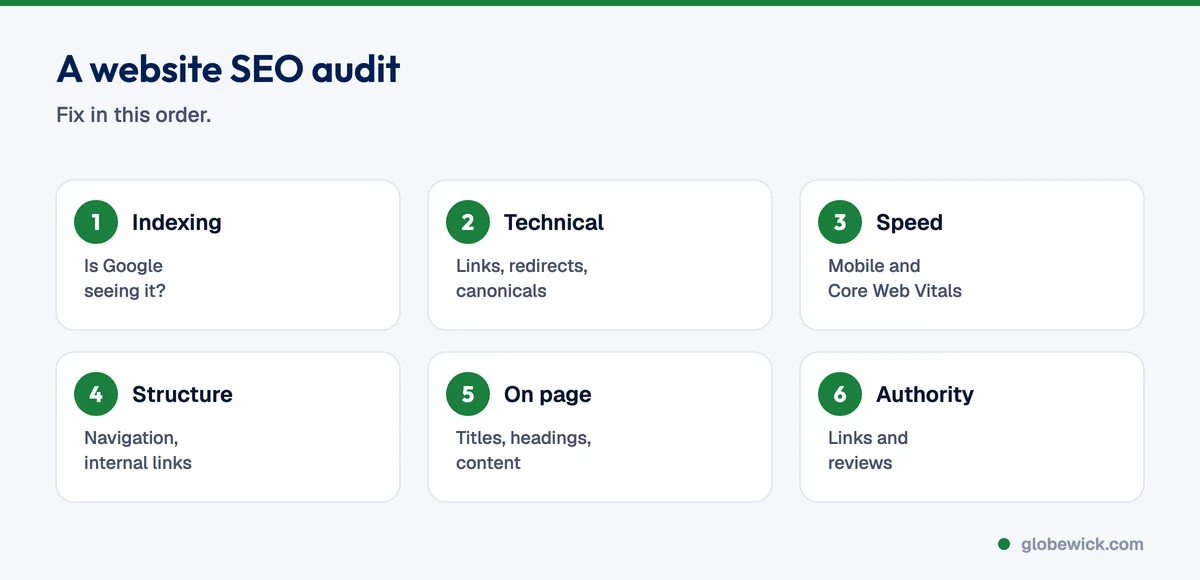
This is the order we follow when auditing a new client site. Work top to bottom, because problems higher up block everything below.
Step 1: Indexing and crawling
Check the Pages report in Search Console. Are your important pages indexed? Look for pages blocked by robots.txt, set to noindex by mistake, or marked "Crawled, currently not indexed". Check that the XML sitemap is submitted and only lists pages you want indexed.
Step 2: Technical health
Look for broken links, redirect chains, duplicate pages without canonical tags, mixed http and https versions, and slow mobile pages. Our post on technical SEO basics that still get overlooked lists each check with fixes.
Step 3: Speed and mobile
Most searches in India and a majority globally happen on phones. Test your top templates (home, category, product or service, blog post) on mobile. Heavy images, too many apps or plugins and large scripts are the usual causes. Read why site speed matters for SEO and conversion.
Step 4: Site structure and internal links
Can a visitor reach every important page within three clicks from the home page? Do service, category and product pages get links from related blog posts? Orphan pages with no internal links rarely rank. See internal linking, the free SEO lever.
Step 5: On-page content
For each key page, check that the title tag and H1 match the main search, the meta description gives a reason to click, the content answers the question better than the pages already ranking, and images have descriptive alt text. Use our on-page SEO checklist.
Step 6: Keyword gaps and cannibalisation
List the searches you want to rank for and the page meant to rank for each. If two pages target the same search, merge them or make their focus different. If an important search has no page, plan one.
Step 7: Authority and local signals
Compare the number of linking domains to your site and to the sites ranking above you. For local businesses, check your Google Business Profile, reviews and consistency of name, address and phone across directories.
What does a website SEO audit report include?
| Area | What we check | Typical priority |
|---|---|---|
| Indexing | Indexed pages, noindex tags, robots.txt, sitemap | Fix first |
| Technical | Broken links, redirects, canonicals, https, structured data | High |
| Speed and mobile | Core Web Vitals, mobile layout, image weight | High |
| Structure | Navigation, URL patterns, internal links, orphan pages | Medium to high |
| On-page | Titles, headings, content depth, intent match | Medium to high |
| Keywords | Gaps, cannibalisation, page to keyword map | Medium |
| Authority | Linking domains, brand mentions, reviews | Ongoing |
A useful audit ends with a short, ordered fix list, not a 200-page export of every warning a tool can produce. Many warnings do not affect rankings at all.
How do you design a website for SEO?
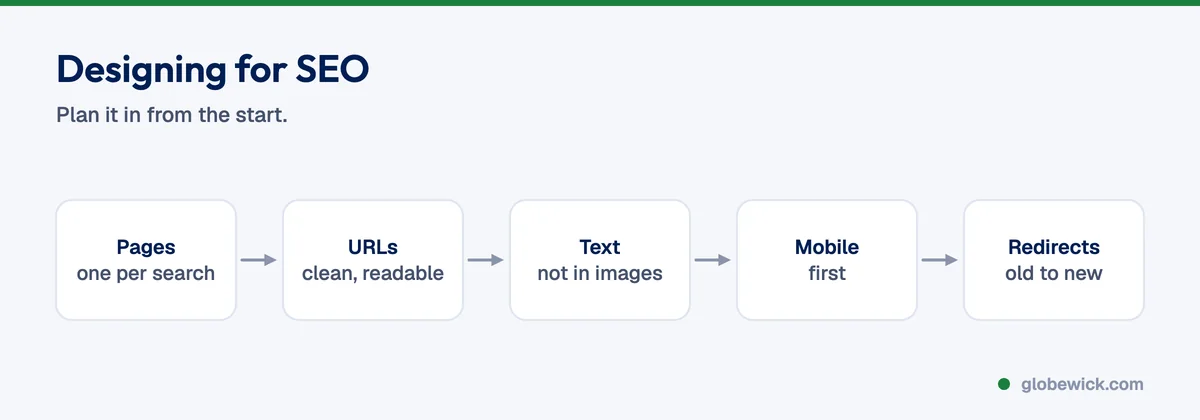
If you are building or redesigning a site, SEO is far cheaper to plan in than to fix later. The website design and SEO decisions that matter most:
- Plan pages around searches. Do keyword research before the sitemap, so each service, category or location people search for has its own page. Our keyword research guide explains how.
- Use clean, readable URLs such as /services/meta-ads rather than /page?id=123.
- Keep text as real text, not inside images or sliders, so Google can read it.
- Choose a fast platform and theme. Shopify, WordPress with a light theme, Webflow and static sites can all rank well if built carefully.
- Design for mobile first, with readable fonts and buttons that are easy to tap.
- Protect rankings during a redesign. Map every old URL to its new one with 301 redirects before launch, and keep the content that was ranking.
Redesigns without a redirect plan are one of the most common reasons we see sites lose most of their organic traffic overnight.
How do you check your website's SEO ranking?
Search Console's Performance report shows your average position for each search and page, for free. For daily positions by city or country, use a rank tracker. Searching your keywords in Google yourself gives a rough view only, because results change with location and history. See our rank tracker guide for the options.
Website SEO in India and global markets
The ranking rules are the same everywhere, but competition and behaviour differ. In India, mobile speed on mid-range phones and slower networks matters more, Hindi and regional language searches are growing, and local "near me" searches are huge for clinics, gyms and service businesses. In the US, UK and Australia, competition for commercial searches is usually tougher, so content depth and links carry more weight. If you serve several countries from one site, use clear country or language sections and hreflang tags, rather than one page trying to rank everywhere.
What is the best website for SEO?
There is no single best platform. The best website for SEO is one that loads quickly, is easy to update, lets you control titles, URLs and redirects, and has a page for every search that matters to your business. Shopify suits most D2C stores (see our Shopify SEO checklist). WordPress suits content-heavy and service sites. What you publish and how well it is structured matters far more than the platform.
Want a website SEO audit with a clear, prioritised fix list, and help carrying it out? See our SEO agency services.
FAQs
How do I check if my website is SEO friendly?
Check that your key pages are indexed in Search Console, load quickly on mobile, have unique titles and headings that match what people search, and are linked from other pages on your site.
Can I do a free SEO audit of my website?
Yes. Google Search Console, PageSpeed Insights, a site: search and the free version of a crawler like Screaming Frog cover the most important checks for a small site.
How often should I audit my website's SEO?
Do a full audit once or twice a year and after any redesign or platform change. Check Search Console for new errors every month.
How long does website SEO take to show results?
Technical fixes can show results within weeks once Google recrawls the pages. New content and links usually take three to six months, longer in competitive categories.
Does website design affect SEO?
Yes. Design decides speed, mobile usability, how text is presented, site structure and internal links, all of which affect rankings. A redesign without redirects can also lose existing rankings.
What is a good SEO score for a website?
Tool scores are rough guides, not Google metrics. Focus on indexed pages, Core Web Vitals passing and rankings for your target searches rather than chasing a perfect score.