 GLOBEWICK
Keyword Research: A Step-by-Step Guide for Beginners
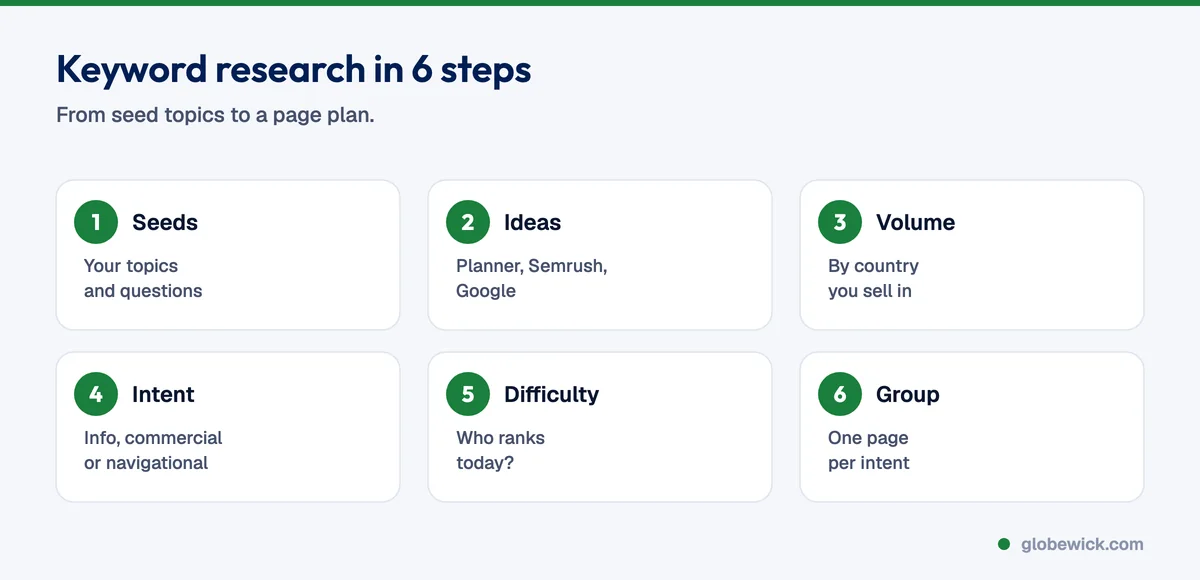
Keyword research is the process of finding the words and phrases your customers type into Google, then deciding which ones to target and which page should target each one. Done well, it tells you what content to create, what to call your pages and which searches are worth paying for in Google Ads. The basic process is: list your topics, collect keyword ideas with a tool, check search volume and intent, look at who ranks today, then group the keywords so each page has one clear job.
"Keyword research" itself is searched 100,000 to 1 million times a month in the United States and 10,000 to 100,000 times a month in India, according to Google Ads Keyword Planner data we pulled in November 2026.
Why keyword research matters
- You write for real demand, not for guesses about what people search.
- You use your customers' words, which often differ from your industry jargon. People search "digital marketing course", not "integrated marketing communications programme".
- You avoid wasted pages: topics with no searches, or two pages competing for the same search.
- You choose battles you can win: a new site can rank for specific, long-tail searches long before it can rank for broad ones.
Step 1: List your seed topics
Write down your products or services, the problems you solve, your customers' industries and locations, and the questions your sales team hears every week. These are your seed keywords, for example "seo agency", "meta ads cost" or "how to increase instagram followers".
Step 2: Collect keyword ideas
- Google Keyword Planner: free inside Google Ads. Enter up to 10 seeds and choose a country. It returns thousands of related ideas with volume ranges, competition and top-of-page bids.
- Semrush or Ahrefs: add estimated volumes, keyword difficulty and the pages ranking today.
- Google itself: autocomplete, "People also ask" and related searches at the bottom of the results.
- Google Search Console: the searches you already appear for, often with positions 8 to 20 that are close to page one.
When we ran this for Globewick across India, the United States and Australia, 60 seed keywords produced more than 38,000 marketing keyword ideas.
Step 3: Check search volume, by country
Volume tells you how many people search a phrase each month. Always check it in the country you sell to, because the same keyword can be big in one market and tiny in another. Do not ignore low-volume keywords: phrases with 10 to 100 searches a month are often very specific and convert well, and together they add up.
Step 4: Understand search intent
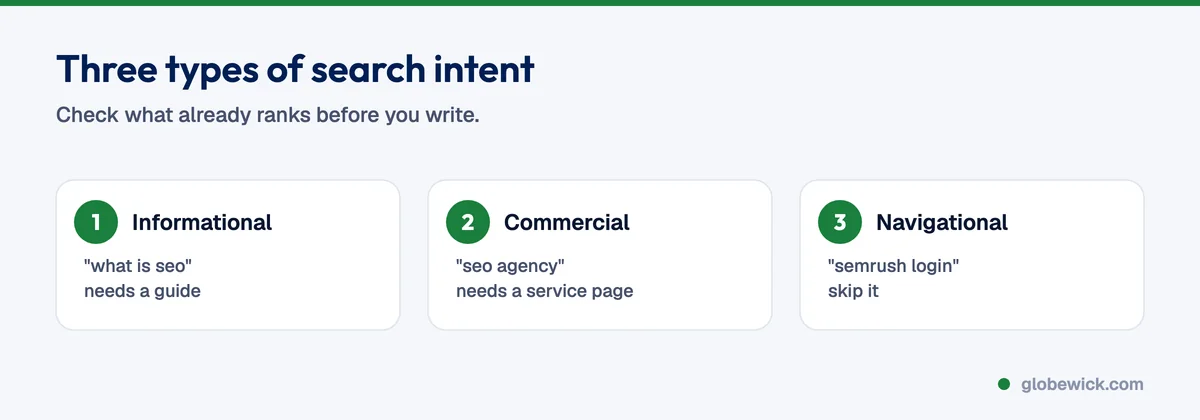
Intent is what the searcher wants. Most keywords fall into three groups:
- Informational (educational): "what is seo", "how to do keyword research". Best served by guides and explainers.
- Commercial: "best seo tools", "seo agency near me", "meta ads cost". The searcher is comparing options or ready to hire or buy. Best served by service pages, pricing guides and comparisons.
- Navigational: "semrush login", "meta business suite". The searcher wants a specific site. You will rarely rank for another brand's navigational searches, so do not build pages around them.
The quickest check is to search the keyword and look at what already ranks. If page one is all guides, a sales page will struggle, and the reverse is also true.
Step 5: Judge difficulty and competition
Look at the pages on page one. If they are huge, well-known sites with many links, a new site needs a more specific angle. Tools give a difficulty score, but your own judgement of the results page matters more. Note that Keyword Planner's "competition" measures advertisers, not organic difficulty.
Step 6: Group keywords into pages
This is the step most people skip. Keywords that mean the same thing belong on one page: "seo services", "seo company" and "best seo agency" are one service page, while "seo cost" deserves its own pricing guide. Grouping stops you publishing several weak pages that compete with each other, an issue called keyword cannibalisation.
- Same meaning, different wording or word order: one page.
- Different platform, city or type of page (course, cost, tools, how-to): separate pages.
- Tiny related keywords: add them as a section or FAQ on the main page.
Step 7: Prioritise
Start with keywords that combine business value and a realistic chance to rank: commercial searches for your core services, then informational topics your buyers research before they buy. Put them in a content plan. Our post on building an SEO content calendar around buyer intent shows how.
Keyword research for different platforms
- YouTube: use YouTube search suggestions and the search terms report in YouTube Studio.
- Amazon and Shopify stores: marketplace search bars and your own site search show the product words buyers use.
- Google Ads: the search terms report shows which real searches led to sales, which is excellent input for SEO.
Common mistakes
- Chasing only the biggest keywords.
- Ignoring intent and putting a sales page where Google wants a guide.
- Targeting the same keyword with several pages.
- Using global volume when you only sell in one country.
- Never revisiting the research as Search Console data comes in.
For the tools mentioned here, see the best SEO tools. For the bigger picture, read what SEO is, or let our SEO team build the keyword map for you.
FAQ
Is keyword research free?
Yes, you can do it with Google Keyword Planner, Search Console and Google's own suggestions. Paid tools save time and add difficulty and competitor data.
How many keywords should one page target?
One main keyword plus its close variants and related questions. That can be dozens of phrases, as long as they share one intent.
How often should I redo keyword research?
Review it every quarter, and whenever you launch a new product, service or market.